Open topic with navigation
Define a Sampling Frame by Nielsen County Size
- Create
a new project or open an existing project.
- Create a new cell.
- On the Define
Frame menu, point to Define Geographic,
then click Nielsen County Size.
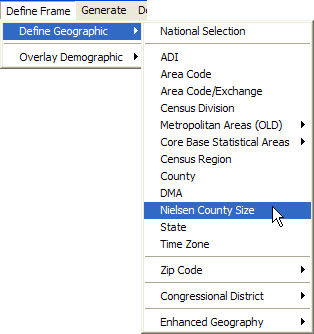
A Define
Non-National Geographic Frame dialog box opens.
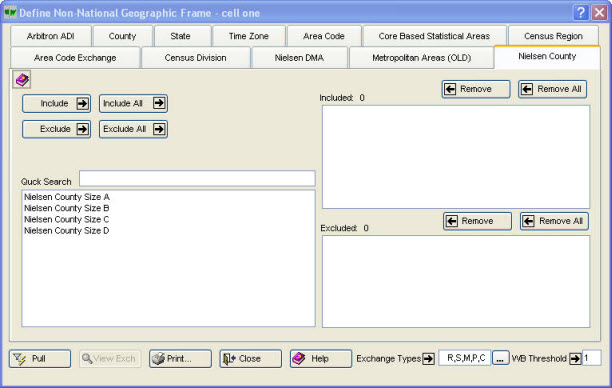
The Nielsen
County Size tab is selected. The cell name is displayed in the
title bar. Include  ,
Include All
,
Include All  , Exclude
  ,
Exclude All
,
Exclude All  , Remove
  , and
Remove All
, and
Remove All  are provided for convenience.
- Define the cell's geography.
To
select a Nielsen County Size and move it into the Included
box
- Type
the first character or two of the item into Quick
Search box.
- Do
one of the following:
- Click once on the item, then click Include
 .
.
- Click twice (double-click) on the item.
- After a cell has been defined, including the Exchange Types
 and WB (Working Bank)
Threshold
and WB (Working Bank)
Threshold  , click Pull
  to retrieve the corresponding exchanges.
- A message displays the number of exchanges pulled
that serve the defined geographic area.
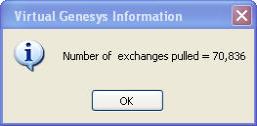
(Click OK  .)
.)
- Click Close
 , click View Exch
  for a View Exchanges dialog box, or click
Print
for a View Exchanges dialog box, or click
Print  to open a
Geographic Definition Report for printing.
to open a
Geographic Definition Report for printing.
Open topic with navigation